
AI finds what needs fixing. You decide what to change.
Stop exporting reports. The AI Analyst Kit gives Claude your Google Ads data every morning and checks in with what matters most. So your time in Google Ads goes to the changes that grow your account.

Store Growers is trusted by the world’s top ecommerce brands and agencies:

Already using AI for Google Ads, but not getting much out of it?
In October I asked our email list how you use AI in your Google Ads account. Most people who replied do the same thing: export reports and upload them to ChatGPT or Claude.
That’s a good start. But I’m guessing some of this sounds familiar:
- You export a report, upload it and explain your business again. Every time.
- The answers could apply to any account.
- You fix whatever catches your eye, usually something small.
- And your results barely change.
None of this means AI doesn’t work for Google Ads. But the way you’re using AI is missing three things.
Why your AI gives generic answers
Out of the box, Claude and ChatGPT give OK Google Ads advice. Where they fall short is taste: a stance on what good looks like. They haven’t logged into 700 different Google Ads accounts, so they can’t spot the pattern an experienced specialist recognises in seconds.
On top of that, they’re missing three things:
1. A method
Your AI misses how an experienced Google Ads specialist works through an account. So it answers whatever you happen to ask that day.
2. Your context
It doesn’t know your margins, your targets or which campaigns to leave alone. So you explain it again, every session.
3. Your data
It only sees the reports you remember to export. Everything else stays invisible.
Give your AI all three, and the answers change.
Introducing the AI Analyst Kit
The AI Analyst Kit turns Claude into an analyst for your Google Ads account.
- The method: a knowledge base distilled from four Store Growers courses (about 25 hours of lessons) and updated for how Google Ads works in 2026.
- Your context: your AI reads your account and writes down what it learns: what you sell, your brand terms, your ROAS per category.
- Your data: one script sends your Google Ads data to Google Sheets every morning: campaigns, search terms, products, keywords, assets and every change made in the account.
And it doesn’t wait for you to ask. On a schedule you pick, it checks your account and tells you what needs your attention.
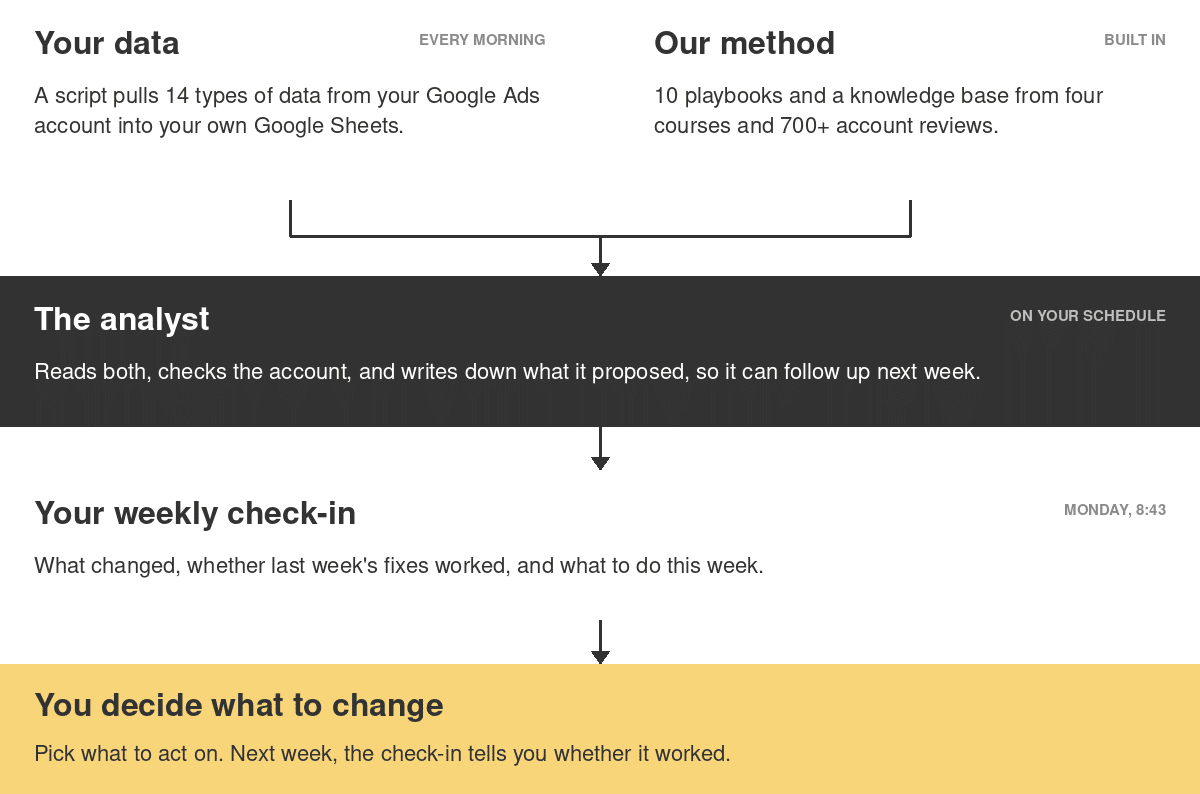
Think of it as a junior analyst who has studied every lesson we’ve recorded and has access to all your data. They do the digging and identify what’s most urgent. You decide how to act on it.
We built this for our own accounts first
For 11 years, Store Growers sold courses. More than 2,500 advertisers learned our method that way.
People don’t buy a course for the course. They want the outcome: better results from Google Ads. For a long time, a course was the best way we could deliver that.
But if we’re honest, AI can now get you those outcomes without sitting through 25 hours of video. It won’t make you an expert. But you’ll get a better outcome.
I started where most of you are now. Exporting the last 180 days of campaign performance and asking for trends. Then one week later having to re-upload the new data.
It helped, but this method of working required a lot of manual labor. So when I was short on time, I’d skip it and go back to my old ways of doing things.
And the answers were only as good as the question I happened to ask that day.
Two things changed that.
First, I stopped exporting. Every morning, data from the accounts we manage now lands in Google Sheets: performance per campaign, search terms, ad assets and more.
Second, I gave the AI our method. I loaded all our course transcripts into Claude and distilled what we teach on each topic. From then on, it looked at accounts the way we do.
That’s how we work in 2026. The AI Analyst Kit is the same setup, packaged so you can install it in your own account.
This is what running Google Ads looks like in 2026
| Without AI | With AI on your own | With the AI Analyst Kit | |
|---|---|---|---|
| Your data | Digging through reports | Exported and uploaded by hand | In Google Sheets, every day |
| Your account context | In your head | Re-explained every session | Saved once |
| The method | Your own experience | Whatever you ask that day | The Store Growers frameworks |
| When it looks at your account | When you find time | When you ask | Every morning or week, on its own |
| Experiments | From memory | From memory | Logged, with ideas for what’s next |
| Who decides and makes changes | You | You | You |
Look at the last row. It’s the same in all three columns.
There is a reason for this. We think AI is great, but you shouldn’t outsource your thinking to it.
On top of that, we don’t believe an AI should have edit access to your account. At least not yet. In our own work, we’re still testing how far we can let AI make changes, and it’s still risky. That’s not something we want to recommend to everyone using this kit. So AI prepares the changes, and you decide what goes in.
Up and running in 15 minutes
- Paste the script into Google Ads (about 5 minutes). It creates your two Google Sheets and fills them every morning.
- Connect Claude to Google Drive and Google Sheets, and add our analyst skill (about 5 minutes).
- Type “start” (about 5 minutes). Your AI reads your account, saves what it learns, asks four questions and sets how often it checks in.
Then you pick where to begin:
- A quick win: the one fix that saves or earns the most right now, with step-by-step instructions.
- A deep analysis: the same checklist we use for client audits. Every check rated good, improve or bad, plus your top 5 fixes in order.
What it looks like on a real account
Here’s a check-in from one of our own accounts, from Monday morning. Anonymised, otherwise untouched.
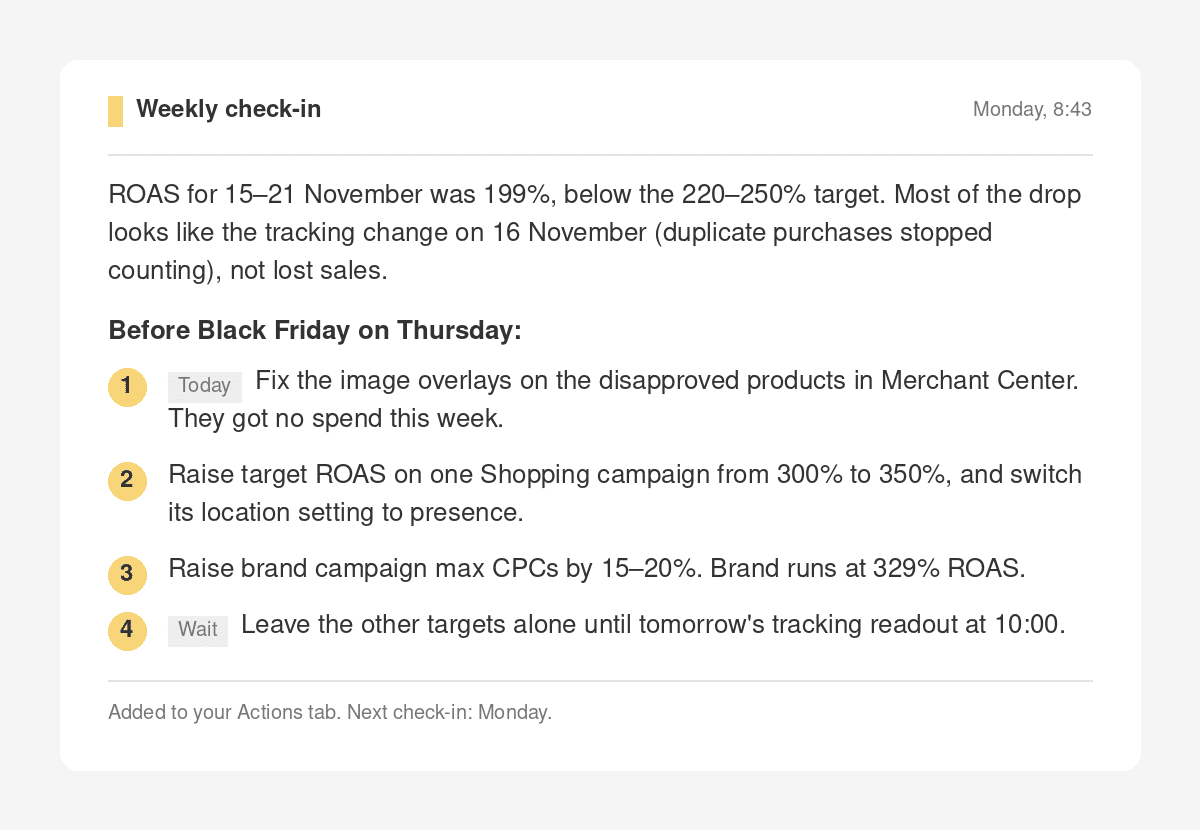
Now picture it on your own account
Monday morning. You open Claude, and your check-in already ran, without you asking.
It tells you what changed last week, and checks on what you did. The negatives you added: are those searches gone? The target you raised: did it slow things down as expected? Then it lists what needs your attention this week, and what to leave alone for now.
You pick what to act on. Next week’s check-in tells you whether it worked. You can close Google Ads for the week, confident that nothing is slipping through the cracks.
What you can ask your analyst
| Area | Ask for example | What you get |
|---|---|---|
| Check-in | “How did last week go?” | What changed, what worked, what to do this week |
| Search terms | “Where am I wasting money?” | Search terms to block, and searches that deserve their own keyword |
| Campaigns | “Why is Shopping down?” | A drill-down to the cause, judged on the campaign’s stage |
| Products and feed | “Which products should I push or cut?” | Your products sorted into heroes, zombies and the ones Google ignores |
| Ads | “Write a new ad for this ad group” | Responsive search ads built on our headline types |
| Tests | “Should I test this?” | A test plan with duration and stop rules, and the readout when it’s done |
| Audit | “Run a deep analysis” | Our client audit checklist, applied to your account |
| Second opinion | “Should I follow this Google recommendation?” | A devil’s advocate that pokes holes before you act |
Or ask anything about how we run Google Ads: “What channel prioritization should we pick on our pMax campaigns?”
Fixing what’s broken only gets you so far
A weekly review improves what’s already in your account. That’s useful. But keep fine-tuning the same setup, and sooner or later your account plateaus.
Over a long enough time frame, running experiments is the only way to grow.
That means stepping back and asking a bigger question: what could this account look like? A different campaign structure. A category you push much harder. A bidding strategy you’ve never tried. Then testing it, without betting the whole account on it.
That’s what Testing Lab, our course for advanced advertisers, is about: how to keep improving once the best practices are in place. At its core is a testing process. The hard part is sticking to it when you get busy.
Now that process is part of the kit. Your AI doesn’t stop at spotting problems. It suggests what to test next, keeps track of every test, explains what the results mean for the next one, and keeps a list of what’s proven to work in your account, which it checks before it suggests anything new.
So once a month, you ask your AI a different question: what should we test next?
Who the AI Analyst Kit is for
Ecommerce owners who run their own Google Ads
- Find out where your next growth comes from, so adding budget stops meaning higher costs and nothing more.
- Make changes with confidence, so you stop leaving a working account untouched while Google changes everything around it.
- Spend your Google Ads time on what matters, so the hour you do have goes to the change that moves results.
- Keep your PPC manager or agency in check, so you know whether they’re bringing in new customers, not just a nice ROAS number.
Agencies and freelancers
- Have a real answer when clients ask how you use AI, so you win the pitch instead of sounding behind.
- Show clients what they pay you for, so AI makes your retainer easier to justify, not harder.
- Handle more accounts without hiring, so the digging and reporting no longer eats your margin.
- Run every client account the same way, with the same method and the same check-ins, so nothing slips through and new clients are up to speed in days.
This isn’t for you if:
- You want your Google Ads on autopilot. Our kit does the analysis. You still make the decisions and the changes.
- You’re new to Google Ads. The kit assumes you know your way around the account.
- You spend less than about $2,000 a month. With that little data, there isn’t much for the AI to analyse.
Who’s behind it
I’m Dennis Moons, founder of Store Growers. I’ve worked in Google Ads for 15 years and started Store Growers in 2015. I’ve managed over $10 million in ad spend, and more than 2,500 advertisers have learned our method.
Together with Dylan, our Head of Google Ads Strategy, I’ve reviewed 700+ Google Ads accounts. The frameworks in the kit are the ones we use on client accounts today.

Dennis Moons
Founder

Dylan McKinley
Head of Google Ads Strategy
Everything inside the AI Analyst Kit
The analyst
- 10 playbooks: setup, check-in, search terms, campaigns, products and feed, ads, tests, deep analysis, fix and devil’s advocate, so every question gets a fixed, tested way of working.
- A knowledge base of 38 topics from four courses, updated for 2026, so your AI judges your account the way we do.
Your data
- One Google Ads script that fills two Google Sheets every morning, so your AI always works from fresh numbers.
- Working tabs in your Sheet: your account context, an action list, a change log that fills itself, and a tests log. So your AI remembers what you decided, what you changed and what you tested.
The help
- A quick-start video, so you’re running in about 15 minutes.
- A live workshop on Friday 11 December at 4 PM CET (10 AM Eastern, 7 AM Pacific): 90 minutes, with Q&A at the end.
- The workshop recording.
The courses
- Full access to the video courses: Google Ads Success, Google Ads Bootcamp, Feed Frenzy Challenge and Testing Lab.
- All transcripts as a reading library.
One purchase covers every account you manage.
Live walkthrough: the kit on a real account
Reading about a setup is one thing. Seeing it run is another. We take the kit through a real Google Ads account, live:
- How the check-in, the action list and the tests work together
- What we act on, and what we leave alone
- Your questions, answered at the end
- When: Friday 11 December, 4 PM CET (10 AM Eastern, 7 AM Pacific)
- Length: 90 minutes
- Can’t make it? You get the recording
Get your first moves right, with us
The kit tells you what to fix. The hard part is deciding what to fix first.
Some fixes are obvious. Others need judgment: a restructure, a new bidding strategy, which category to push harder. Get those wrong and you lose weeks. That’s where 15 years and 700+ account reviews make the difference.
With the strategy call, you run your deep analysis first. Then you get 60 minutes with me or Dylan, on your account:
- We go through your deep analysis together, so you know what the findings mean for your business
- We put your fixes in order: what to do first, what can wait, and what to skip
- We pick your first test, so you start growing, not just fixing
You leave with a clear plan, and the kit to carry it out.
Only 10 spots. $249 on top of the kit.
Choose your package
The AI Analyst Kit
Build it yourself, at your own pace.
- The AI analyst: 10 playbooks and a knowledge base from four courses
- Data script and Sheets, running in 15 minutes
- Four video courses plus transcripts
- Live workshop on 11 December, plus recording
- Use it on all your accounts
- 30-day money-back guarantee
Kit + strategy call
The kit, plus a 1:1 call to plan your first moves.
- Everything in the kit
- A 60-minute 1:1 call with me or Dylan
- We go through your deep analysis together
- Your first fixes in order, plus what to test first
What you need: a paid Claude plan (Pro or Max), access to your Google Ads account, and Google Drive.
Available until Tuesday 1 December, 11:59 pm Pacific time
Why it’s only available until 1 December
This is the setup we use on our own client accounts every day, and that’s where our focus stays.
We’re opening it up once, for one group, so we can support everyone properly: the live workshop on 11 December, and room for your questions. It’s available until Tuesday 1 December, 11:59 pm Pacific time. After that, we close the doors.
Everything you get is yours to keep: the files, the scripts and the workshop recording.

Try it for 30 days. The risk is on us.
Set up the kit, run it on your own account and see what it finds.
If it isn’t worth it to you, email support@storegrowers.com within 30 days and you get every dollar back. No questions, no hoops.
We’re happy to make this promise, because we use this setup on our own accounts every day and understand what it can do for you.
Your other options
You could keep exporting reports by hand. It works, but it only happens when you find the time, which is usually after something went wrong.
You could keep asking AI questions without your data. You’ll keep getting answers that could apply to any account.
You could follow Google’s own recommendations. These swing with whatever new feature they’re promoting: AI Max, bigger budgets, more Demand Gen.
You could connect an AI agent or a connector straight to your Google Ads account. That gives your AI your data, but not a method, your context or the history of what you’ve tested. And the agents that make changes for you take the decisions out of your hands too.
Or you give your AI the method, the context and the data. It does the digging. You decide what to change.
AI finds what needs fixing. You decide what to change.
Here’s what you get with the AI Analyst Kit:
- The AI analyst for Claude: 10 playbooks and a knowledge base from four courses
- One script that sends your Google Ads data to Google Sheets every morning
- Check-ins on a schedule you pick, with an action list that follows up
- Four video courses plus all transcripts
- A live workshop on Friday 11 December, plus the recording
- Use on all your accounts, with a 30-day money-back guarantee
$399 until Tuesday 1 December, 11:59 pm Pacific time. Then it’s gone.
FAQ
Do I need to be technical?
No. You paste one script into Google Ads, connect two apps in Claude and type “start”. About 15 minutes, with a step-by-step video. If you get stuck, bring your question to the Q&A at the end of the workshop.
Does it work with Claude and ChatGPT?
The kit is built for Claude. You need a paid Claude plan and the Google Drive and Google Sheets connectors, because the check-in runs on a schedule and reads your Sheets. You can ask the method questions in ChatGPT too, but the scheduled check-ins and the action list need Claude.
How is this different from connecting Claude to Google Ads with an MCP?
A connector gives your AI access to your data. The kit gives it a way to think about that data: the knowledge base from our courses, your account context and the history of your experiments.
Can the AI change my account?
No. The script only reads your Google Ads data and writes it to your Google Sheets. The AI reads those Sheets and writes its notes there, but it never touches Google Ads. You make every change in your account yourself.
Where does my data go?
To two Google Sheets in your own Google Drive, and from there into your own Claude account. Your AI also writes its notes there: your account context, the action list and your tests. We never get access to it.
I already use AI for Google Ads. Is this for me?
Yes, if you export reports or ask questions without your data. The kit removes the exporting and gives your AI a method to work from. If your data already flows in automatically, you’ll mostly use the knowledge base, the playbooks and the check-ins.
I’ve never used AI for Google Ads. Is this for me?
Yes, as long as you know your way around Google Ads. The quick-start video takes you from installing the script to your first check-in.
Can’t I just ask ChatGPT?
You can, and you’ll get answers. But without a method, your context and your data, those answers stay generic. The kit gives your AI all three.
Is this information up to date?
Keeping video courses up to date was a full-time job for our team: Google keeps releasing new features and changing how things work. With the kit, we went through the whole knowledge base and updated it for how Google Ads works in November 2026. The videos and transcripts are as we recorded them; the knowledge base is what your AI works from.
I run an agency. Can I use it on client accounts?
Yes. One purchase covers every account you manage. With a manager account, you install the script once and label the accounts you want in the kit, up to 50. Every client gets its own project in Claude.
How much do I need to spend on Google Ads?
About $2,000 a month or more. Below that, there usually isn’t enough data for the analysis to be useful.
When do I get access?
Right after purchase, you get access in Podia: the kit files and a quick-start video. The live workshop is on Friday 11 December at 4 PM CET (10 AM Eastern, 7 AM Pacific). If you can’t make it, you’ll get the recording.
Will the kit be updated?
No. This is the November 2026 version. You keep everything you buy, but we don’t promise updates.
What support do I get?
Bring your questions to the workshop: we keep time for Q&A at the end, and you can send them in beforehand to support@storegrowers.com.
How does the strategy call work?
After purchase, we’ll send you a link to book your call: 60 minutes with me or Dylan. We go through your deep analysis together, put your fixes in order and pick what to test first.
What if it’s not for me?
You have 30 days. Email support@storegrowers.com and we’ll refund you.
Is there a payment plan?
No. The kit is a one-time payment.
Why is the price in the checkout different from this page?
There are 2 reasons why the price on this page might be different from the price in the checkout:
- Local currency: our payment system automatically converts the price in US dollars to your local currency.
- VAT: the system also adds VAT where appropriate. If you have a VAT number, you can take off this amount: look for the small link on the right-hand side of the checkout to add your VAT number.
I already own one of your courses. Do I pay $399?
No. Students get a separate offer: check your inbox, or email support@storegrowers.com.