Shopping Ads account for roughly 80% of Google Ads spend in ecommerce. They work because they show the product before the click: image, price, store name, rating. Someone searches for “lightweight running shoes,” and your ad shows a photo of the shoe, the price, and your store. They know what they’re getting before they ever click.
Here’s the problem: two different campaign types can run Shopping Ads (Standard Shopping and Performance Max), and it’s not obvious which to use or how to get started. Your first campaign might be 10x less profitable than it should be, and you won’t know why.
This guide covers how Shopping Ads work, how to decide between Standard Shopping and Performance Max, and points you to deeper guides for each step. You don’t need to read everything here. Find your situation and follow the links.
What Are Google Shopping Ads?
Shopping Ads are visual product ads that appear when someone searches for a product on Google. They show an image, product title, price, store name, and rating. They appear in Google search results, the Shopping tab, Google Images, and Google partner sites.
They’re different from Search Ads in three ways. First, they’re visual: a photo + price filters out people who can’t afford your product or don’t want that style. Second, they’re product-specific: you can’t bid on a “running shoes” keyword and show every shoe you sell. Third, Google automatically matches your products to search queries based on your product feed data, not keywords you pick.
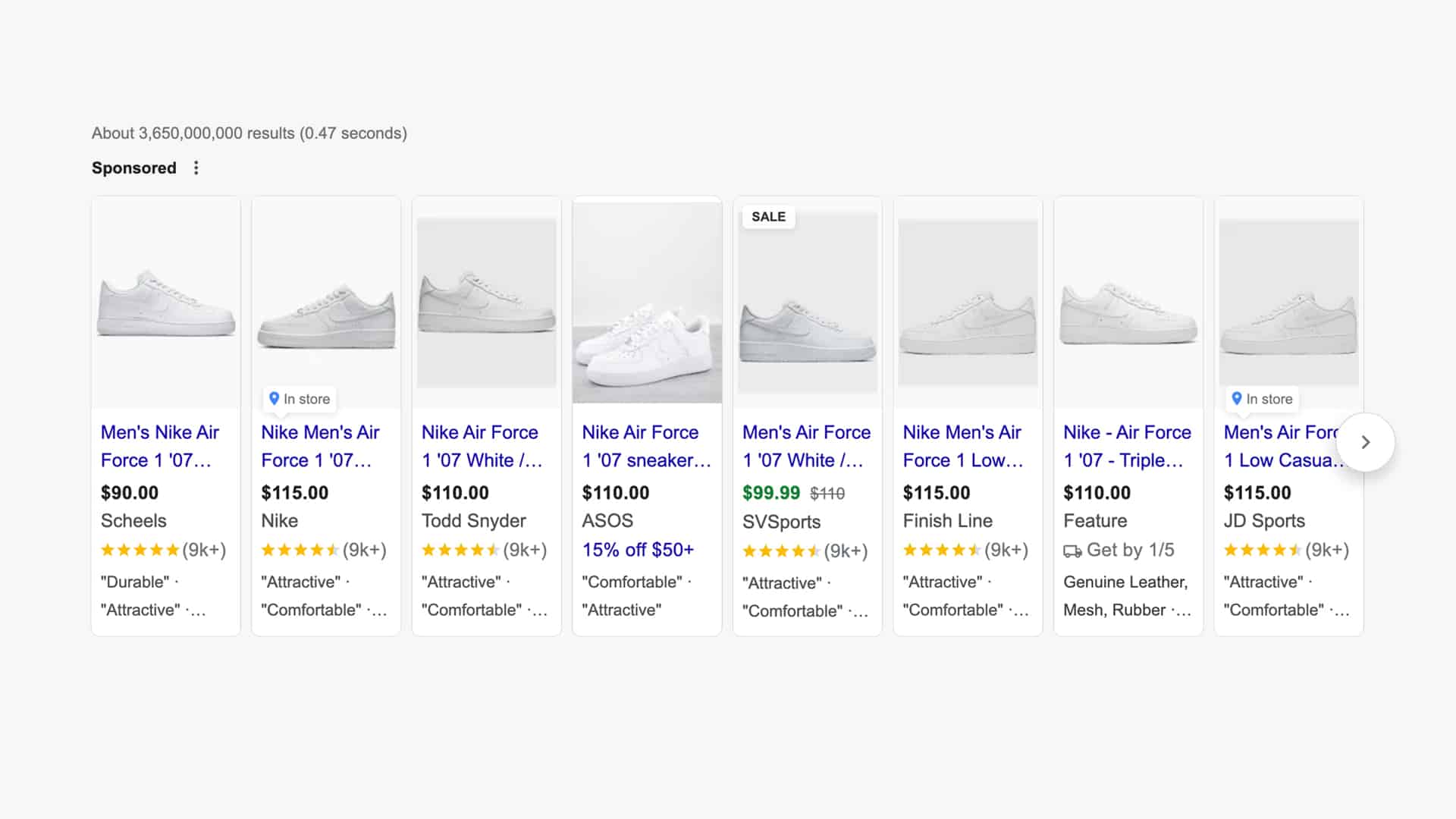
Shopping Ads appear alongside regular search results, in the Shopping carousel near the top of the page, and in Google Images. On mobile, they often take up half the screen. They’re impossible to miss.
Why Shopping Ads work for ecommerce
Shopping Ads convert well because they capture high purchase intent. Someone searching for “best lightweight running shoes under $100” is ready to buy. They’re not researching or comparing categories. They want that shoe.
The visual format does heavy lifting. A 5-second glance shows the person whether they want your product. No misleading headlines or clickbait. The price is visible before the click. That means fewer wasted clicks and better conversion rates than Search Ads.
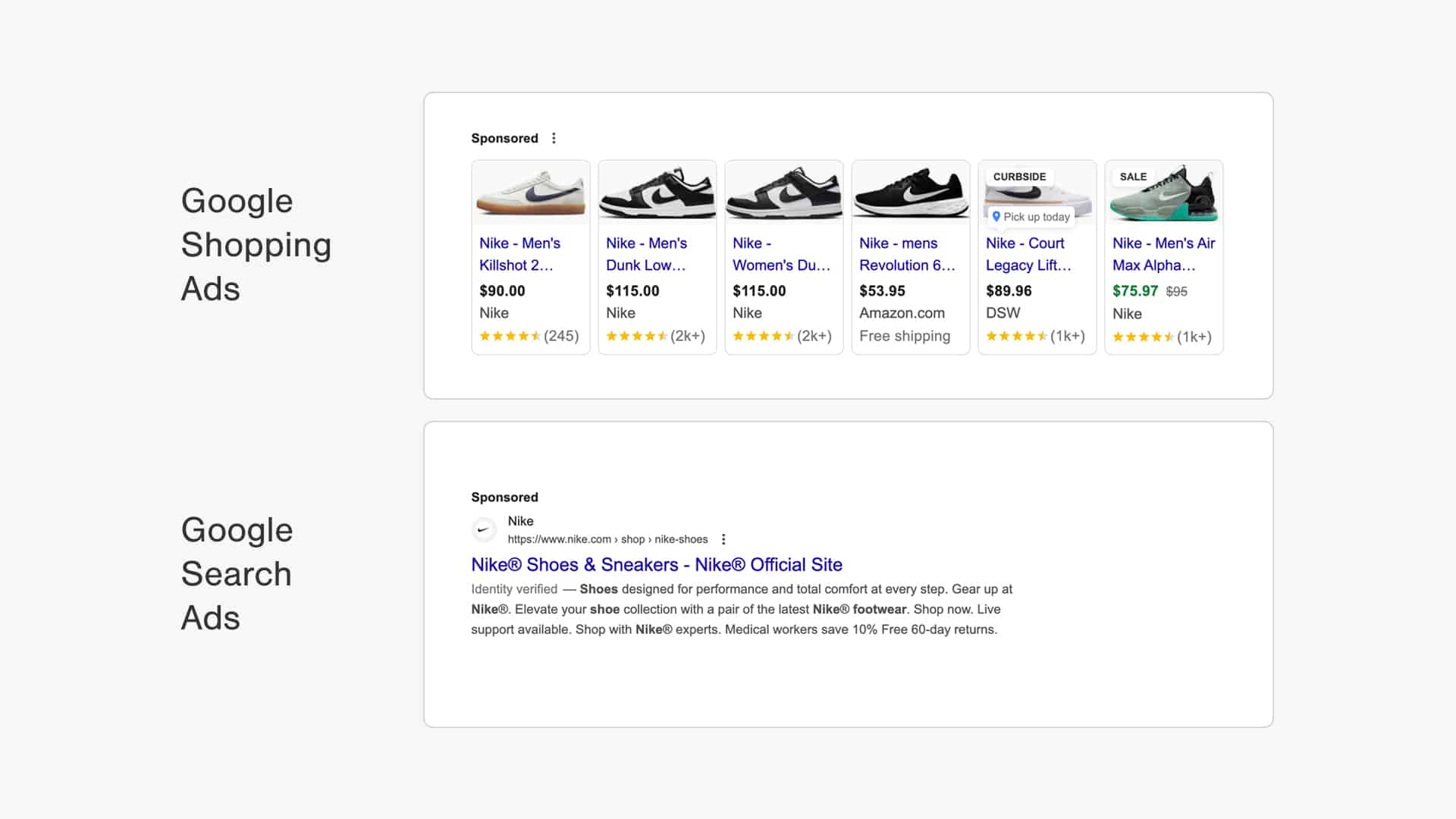
If you were looking to buy new Nike Air Max shoes, which ad would you click on: the Shopping or Search Ad?
One study showed that optimizing product titles alone increased impressions by 147%. Better product data feeds better ads, which feed the algorithm better performance data, which makes your products more visible. It’s a compounding effect.
Shopping Ads also have competitive CPCs. You’re not bidding against every competitor for a keyword. You’re bidding on products. That keeps costs lower than equivalent Search campaigns.
Want numbers? Check the shopping ads benchmarks for your industry. Your results should land somewhere in that range if your feed and campaign are solid.
How Do Google Shopping Ads Work?
Shopping Ads run on a three-piece system: your product feed, Google Merchant Center, and your Google Ads campaign.
Your product feed is a spreadsheet (usually CSV or XML) that contains every product you want to advertise. It includes columns like title, description, image URL, price, availability, product ID, and dozens of optional fields.
Feed quality is everything. A product with a blurry image, a vague title, or a missing price will barely show.
Google Merchant Center is where you upload and manage that feed. It’s a separate account from Google Ads. Merchant Center checks your feed for errors, flags missing required data, and lets you preview how Google will interpret your products.
Your Google Ads campaign pulls products from Merchant Center and runs bids against them. You set a budget, pick which products to advertise, and let Google show them to people searching for them.
You don’t pick keywords. Google matches your product data to search queries automatically. If your title says “lightweight breathable running shoes” and someone searches “best lightweight running shoes,” Google connects the dots. This is why feed quality matters so much. A bad title means Google can’t connect your product to searches that would convert.
Your feed also powers free organic listings in the Shopping tab. But paid ads drive the vast majority of clicks and sales for most businesses.
To get started, read the Google Shopping setup guide. For feed-specific questions, check the product feed guide and Google Merchant Center guide.
Standard Shopping vs. Performance Max
This is the big decision. Two campaign types can show Shopping Ads, and which one you pick affects everything downstream.
| Performance Max | Standard Shopping | |
| Placements | Search Network, Display Network, YouTube, Gmail, Discovery & Maps | Search Network (with Search Partners) |
| Reach | Very wide | Limited |
| Bid strategy | Maximize Conversions or Maximize Conversion Value (with optional targets) | Target ROAS, Maximize Clicks, Manual CPC |
| Level of control | Low | Very high |
| Campaign transparency | Low | High |
| Optimization potential | Medium | Very high |
| Dynamic Remarketing included | Yes | No |
| Impact on Search campaigns | Yes | None |
Standard Shopping campaigns give you direct control. You set bids at the product level. You can see which search queries are triggering your ads. You manually structure how products are grouped and bid on. More work, but more transparency.
You see the keyword someone searched. You understand why your ad showed. You can see which products are profitable and which aren’t. You can make targeted changes: increase the bid on sunglasses in July, decrease it on snowboots.
Performance Max campaigns hand control to Google’s automation. Google sets all bids, decides where to show your ads, and handles all targeting. In exchange, pMax reaches across all Google properties: Search, Shopping, Display, YouTube, Discover, and Maps. One campaign, many placements.
You see search queries but don’t get insights where these searches happen. You don’t control bids. You upload a budget and conversion goal, and Google figures out the rest. It’s a black box.
The 2026 reality is split roughly 50/50. Neither is dead. Neither is the obvious winner. Plenty of profitable businesses run Standard Shopping. Plenty run pMax. Some run both.
If you’re starting out: begin with Standard Shopping. Here’s why. Standard Shopping teaches you what works. You’ll learn which products are profitable, which searches convert, how your audience behaves. You’re gathering business intelligence.
pMax is a black box. If you start with pMax, you won’t know why things work (or don’t). You’ll blame the platform or yourself, but you won’t have the data to know which.
Get 30+ monthly conversions with Standard Shopping first. Then test pMax. You’ll understand enough to evaluate whether pMax is better for your business.
If you’re experienced: many advertisers run both. Standard Shopping for core products where you need control and visibility. pMax for expansion, brand awareness, and testing new markets where you’re okay with less transparency.
For the full pMax strategy, read Performance Max campaigns. For Standard Shopping optimization, read how to optimize Shopping campaigns.
Going Deeper on Shopping Campaigns
While this guide is a big one, it barely scratches the surface of what it takes to win with Google Shopping.
That’s exactly why I developed our Google Ads Success course.
It covers everything I’ve learned from running these campaigns for the past 12 years and much more.
If you want to learn more, I’d love for you to check it out!
On with the article 👇
Getting Better Results from Shopping Ads
The biggest lever is your product feed. Better feed quality creates a cascading effect: better ads, better impressions, better clicks, better conversions.
Product feed optimization
Your feed is the foundation. It doesn’t matter if your campaign structure is perfect or your bidding strategy is sophisticated. A bad feed caps your results.
The three highest-impact optimizations are product titles, images, and product identifiers.
Titles should include the product type, key attributes, and brand. “Cotton t-shirt” is weak. “Organic cotton t-shirt, size M, blue, AllBirds” is strong. Google uses the title to match your product to search queries. Vague titles mean missed matches.
Images should be clean, well-lit photos of the product. No lifestyle shots, no models, just the product. Google’s image quality directly affects your ad visibility.
Product identifiers (UPC, EAN, manufacturer ID) let Google match your products to its database of known products. This improves quality score and click-through rate.
Read the product feed optimization guide and product title guide for specific tactics.
Campaign structure
The default structure (1 campaign, 1 ad group, all products) is a starting point, not the goal. It’s like putting all your inventory in one bin.
Once you’re getting traffic, split by search intent. Sunglasses in summer might convert at 5%. Sunglasses in winter might convert at 1%. Why keep the same bid? Use campaign priority to split high-intent searches (branded + product type queries) into a separate campaign with a higher budget.
Use custom labels to segment products by margin, inventory level, or brand. This lets you bid higher on products that make you more money.
Bidding and audiences
Start with Manual CPC bidding. This forces you to think through your bids and gives you a baseline of performance data.
Once you have 50+ conversions, switch to automated bidding. Target ROAS (return on ad spend) or target CPA (cost per acquisition) let Google optimize your bids without you micromanaging.
Add audience segments as observation, not targeting. Let Google see your returning customers, your website visitors, your mobile users. Don’t restrict your ads to these audiences. Instead, set bid adjustments: bid 20% higher on returning customers because they convert better. Let Google learn.
Read the bid strategy guide for deeper strategy.
What to Expect From Google Shopping Ads?
Average click-through rate for Shopping Ads is 2-4%, depending on your industry. Conversion rates run 1-3%. CPCs average $0.80 to $2.50 for most ecommerce categories.
But averages hide the spread. A poorly optimized Shopping campaign might convert at 0.5% and cost $5 per click. A well-optimized campaign in the same industry might convert at 4% and cost $0.50 per click. The difference is feed quality, campaign structure, and bid management.
Here’s a concrete example. Suppose you sell sunglasses at $80 with a 40% margin ($32 profit per pair).
At poor performance: 0.5% conversion rate, $5 CPC, $100 daily budget.
- 200 clicks per day
- 1 sale per day
- $32 profit, $100 cost
- You lose $68 per day
At good performance: 4% conversion rate, $0.50 CPC, $100 daily budget.
- 200 clicks per day
- 8 sales per day
- $256 profit, $100 cost
- You make $156 per day
The difference isn’t luck. It’s a better product title, a cleaner image, proper campaign structure, and accurate bids.
Don’t expect profitability immediately. Budget for learning. Your first 30 days will be losses. Your job is to gather data: which products move, which searches convert, what your true CPA is. Use that data to optimize. By day 60-90, you should be cash-positive.
For your specific industry benchmarks, check the shopping ads benchmarks page. For real examples of profitable campaigns, read Google Shopping case studies.
Going deeper
Shopping Ads are complex. One guide can’t cover everything. Here’s where to go next.
Getting started
Feed issues
Scaling across countries
Learning from others
Your full Google Ads strategy
If you want video training and a step-by-step checklist, consider the Google Ads Success course. It covers everything here, but with worksheets and real campaign walkthroughs.