People spend weeks building keyword lists. But this is info they can get from tools. The real value is in the actual keywords and search terms. So by running campaigns, you add more keywords with specific match types, expand your ad groups, and all that. You don’t need to do all that work before. Risk wasting a lot of time.
The thing is, if you don’t understand match types, your ads show up for all kinds of searches you didn’t intend. That burns budget fast. Match types control which searches trigger your ads, and understanding them is what separates campaigns that waste money from ones that actually convert.
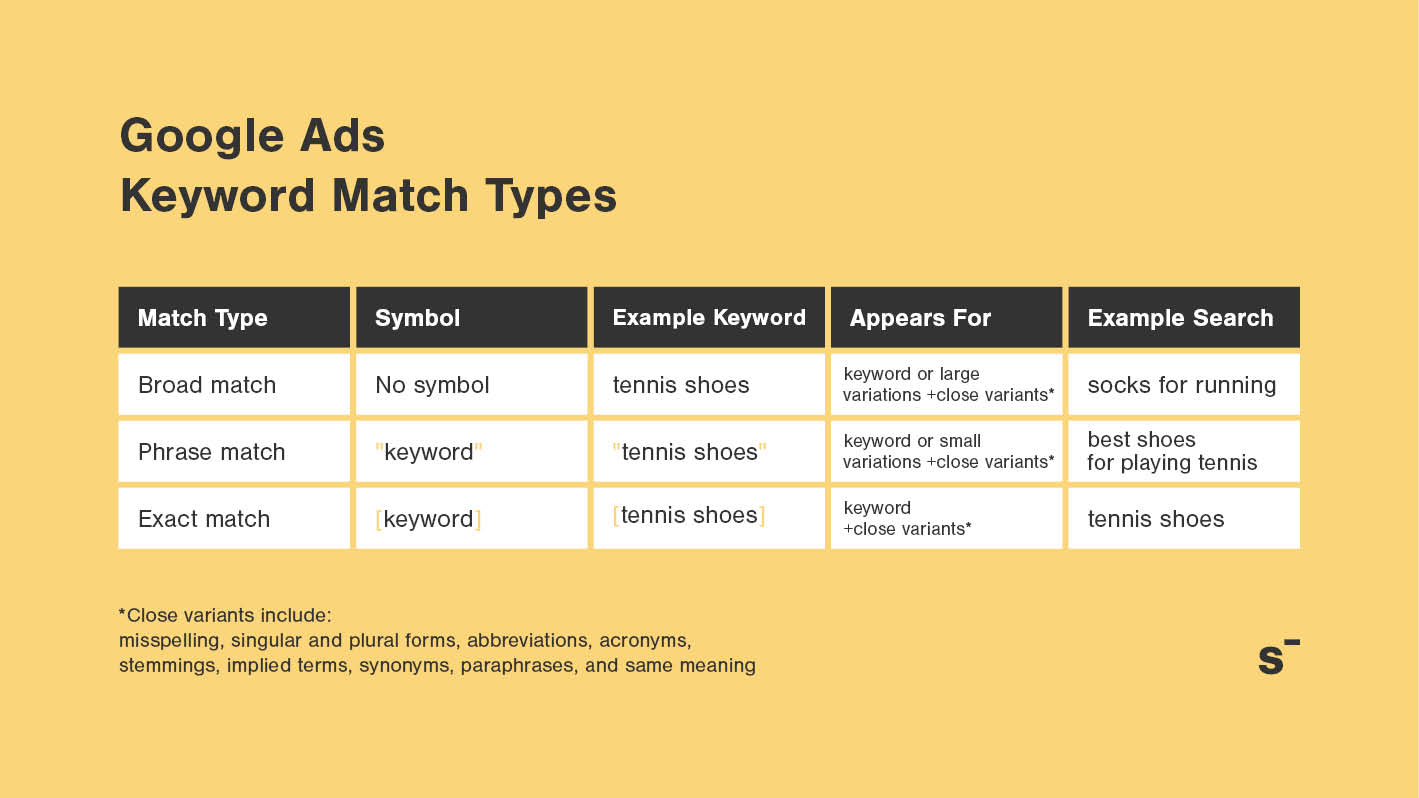
Quick reference: Match types at a glance
| Match type | Symbol | Example keyword | Ad may show for |
| Broad match | none | men jeans | jeans for guys, denim pants, jean shorts, mens casual pants |
| Phrase match | “quotes” | “men jeans” | men jeans walmart, best men jeans, buy men jeans online |
| Exact match | [brackets] | [men jeans] | men jeans, mens jeans, jeans for men, men’s jeans |
| AI Max | toggle on (campaign level | your keywords + AI | all of the above + keywordless queries (not recommended) |
The definitions are hollow now. Before, exact match meant exactly the keyword you typed. Before, phrase match meant the words appeared in that exact order. Google’s added synonyms, reordered words, implied words, stemming. Most advertisers don’t notice until they see unexpected searches in their Search Terms Report.
The best approach: accept it and restructure your campaigns around intent rather than fighting Google’s matching. The exception is high-CPC accounts where intent changes with a few words and each mismatch costs real money. There, it’s worth trading volume for accuracy.
Why match types matter for your budget
Think of keyword match types as the gatekeeper for your ad spend.
Say you sell dry shampoo and add “dry shampoo” as a broad match keyword. Without understanding what broad match does, your ad shows for “shampoo for dogs,” “waterless shampoo,” “homemade dry shampoo,” and dozens of other loosely related queries. Some are fine. Others waste money on people nowhere near buying.
That’s where phrase match and exact match come in. They’re tighter gates. They control which searches actually see your ads, which means you control where your budget goes. Get specific about match types, and your budget stops leaking into irrelevant clicks.
There is no single best match type. Each one has its place depending on your goals, your budget, and how much data you have.
Broad match: Power with a cost
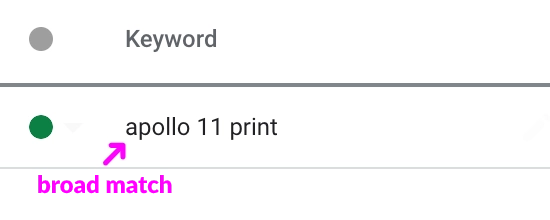
Broad match is Google’s default. The least restrictive option, it shows your ad for searches that “relate” to your keyword. Google interprets “relate” liberally.
When to use it: My opinion on broad match has changed significantly. I now use it most of the time when scaling ecommerce accounts, alongside exact and phrase match when I need to be more specific. The key requirement: always pair broad match with Smart Bidding. Broad match without automated bidding is still a recipe for wasted spend.
Up until a few years ago, broad match was a no-go zone. The AI and machine learning improvements have made it much better. I’ve seen accounts unlock 30-40% more converting traffic by adding broad match to campaigns that had been running on phrase and exact for months.
That said, it’s not without risk. I had a keyword “blue runner sneakers” as broad match. Search terms included “running socks,” “blue paint runner,” and “sneaker cleaning.” Budget burned through on those irrelevant clicks before we caught it. That’s what happens without monitoring.
When to avoid it: If you’re managing accounts with very high CPCs, broad match can be dangerous. When each click costs $15-30, the intent can change with just a few words, and those mismatches cost you dearly. In those accounts, it’s worth trading volume for accuracy by sticking with phrase and exact match.
Phrase match: The middle ground
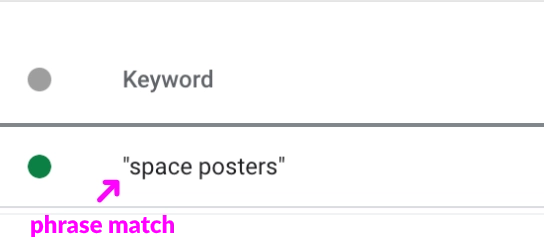
Phrase match shows your ads for searches that “include” your keyword and its meaning, not just the exact word order.
What changed: Before 2021, phrase match meant the words appeared in that exact order. Now it includes synonyms, misspellings, singular/plural forms, function word removal, and word reordering.
For “men jeans,” phrase match shows for these searches:
- men jeans
- best men jeans
- mens jeans (plural variant)
- jeans for men (reordered)
- levis jeans (synonym, sometimes)
- cheap men jeans
When to use it: Use phrase match as your primary match type when starting a campaign. It brings in steady search volume while staying reasonably relevant. Pair it with negative keywords to filter out irrelevant variations as you learn which searches convert.
If one keyword has proven it converts (say, “blue runner sneakers” consistently has a 5% conversion rate over 100 clicks), add that same keyword as exact match to lock in performance. You can have both phrase and exact in the same ad group.The challenge: Phrase match has become broader. If you set up campaigns expecting tight phrase match behavior from years past, you’ll find searches you didn’t intend appearing in your ad group. That’s why reviewing your Search Terms Report weekly is non-negotiable for the first 60-90 days of any campaign.
Exact match: Control, with caveats
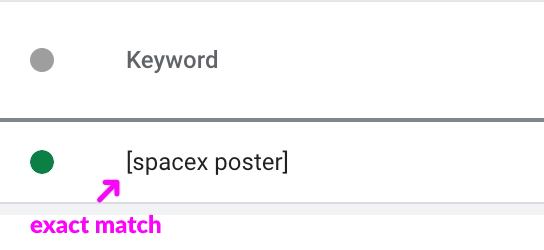
Exact match is the most restrictive option. It shows your ad only for searches that precisely match your keyword or close variations of it.
Close variants now include: misspellings, singular/plural forms, function word removal (the/a/and), word reordering, accents, abbreviations, and stems (floor/flooring).
For [men jeans], exact match shows for these:
- men jeans
- mens jeans
- jeans men (reordered)
- men’s jeans (possessive)
It will NOT show for “jeans for men” or “blue jeans” because those include additional words.
When to use it: Once a keyword has accumulated data (at least 50-100 clicks), check your Search Terms Report. Isolate the high performers, keywords with strong CTR or conversion rates. Add those exact keywords as exact match in the same ad group. This locks in the behavior you’ve proven works.
Exact match works best for branded keywords, specific product names, and established winners. I had a coffee client who saw “whole bean fair trade” convert well, so we added it as exact match to protect that traffic. Exact match kept the spend focused on what actually worked.
The trade-off: You lose some potential traffic because Google applies close variants narrowly. “Whole bean fair trade coffee” won’t trigger because it has additional words. But your CPAs stay lower and your quality improves. For high-intent, high-value keywords, that’s the right trade-off.
Modified broad match: A relic
Google killed modified broad match in July 2021. You can’t create new ones.
If you see keywords with a + prefix (+men +jeans), that’s old modified broad match. Google automatically treats them as phrase match now. Legacy accounts sometimes have hundreds of these. Clean them out and replace with phrase or exact match based on current performance.
AI Max for Search: why I don’t recommend it
Google launched AI Max for Search in May 2025 and is pushing it hard. You’ll see it in your campaign settings as a toggle. Google wants you to turn it on. I don’t think you should.
What it does: AI Max is a campaign-level toggle that overrides your match type settings. It adds two layers on top of your existing keywords. First, it treats all your keywords as if they were broad match, regardless of what match type you set. Second, it adds “keywordless” matching, where Google finds queries based on your landing page content and ad assets, not your keywords at all. Think of it as Dynamic Search Ads bolted onto your Search campaigns.
Why Google is pushing it: Google claims a 14% lift in conversions at similar CPA, and 27% for campaigns mostly using exact and phrase match. Those are Google’s numbers. Independent testing from Adalysis and others tells a different story. They found AI Max can override the standard match type hierarchy, assigning impressions to different keywords than you’d expect. That makes it harder to know what’s actually working.
Why I skip it: If you’re already running broad match with Smart Bidding (which I recommend for most ecommerce accounts), AI Max adds very little. The broad match expansion part is just doing what broad match already does. The “keywordless” part pulls queries from your landing pages, which sounds useful until you realize you can’t control what it picks up. If your product pages mention anything tangentially related, you’ll get tangentially related queries.
The bigger problem is reporting. AI Max muddles your Search Terms Report. You can’t clearly tell which keywords drove which conversions, because the system reassigns impressions based on its own logic. For anyone who needs to explain performance to a client or a boss, that’s a real problem.
What broad match already gives you: Broad match with Smart Bidding does the same core job: finding relevant queries beyond your exact keywords. The difference is that broad match still respects your keyword list as the starting point. AI Max throws that out and lets Google decide entirely. I’d rather keep that anchor.
If you still want to try it: Google gives you some controls. Brand restrictions prevent ads from appearing alongside certain brands. URL exclusions keep AI Max away from specific landing pages. Text guidelines (available globally since February 2026) let you block up to 25 specific words from AI-generated ad copy. But having to set up guardrails to prevent a feature from doing damage is a sign that the feature isn’t ready.
My recommendation: stick to broad match with Smart Bidding. You get the reach without giving up visibility into what’s driving your results.
Negative keyword match types
Negative keywords work alongside your regular match types to control which searches trigger your ads. Where regular keywords tell Google when to show your ads, negative keywords tell Google when not to.
And just like regular keywords, negative keywords have their own match types. But they work differently from “positive” match types, and they haven’t changed over the years.
For the full guide on negative keyword match types, see our negative keyword match types article.
Here’s a quick overview:
Negative broad match
The most restrictive negative type. Blocks any search that contains all the words in your negative keyword, in any order.
negative keyword: men’s jeans
| blue men’s t-shirt | ✅ |
| cheap jeans | ✅ |
| blue men’s jeans | ❌ |
| jeans men’s | ❌ |
| men’s jeans | ❌ |
As you can see above, your ads won’t show for search queries that include the whole “men’s jeans” phrase.
Google will also eliminate those search terms that include the keyword with words after or before as well as queries with reverse versions of the keyword.
However, your ad will still trigger a search query that includes parts of the phrase (”men’s” or “jeans”) as you can see on the examples of “blue men’s t-shirt” and “cheap jeans”.
Negative phrase match
Blocks searches that contain your negative keyword in that exact word order.
negative keyword: “men’s jeans”
| blue men’s t-shirt | ✅ |
| cheap jeans | ✅ |
| blue men’s jeans | ❌ |
| jeans men’s | ✅ |
| men’s jeans | ❌ |
Negative exact match
Only blocks the exact phrase, no extra words. Google uses this as the default when you add a negative keyword.
negative keyword: [men’s jeans]
| blue men’s t-shirt | ✅ |
| cheap jeans | ✅ |
| blue men’s jeans | ✅ |
| jeans men’s | ✅ |
| men’s jeans | ❌ |
How to choose the right match type for your situation
You can’t pick one match type and use it everywhere. The right choice depends on four factors.
First, where are you in the campaign lifecycle? Launching a brand-new ad group? Start with phrase match. It brings volume while staying reasonably targeted. After 2-3 months of data, refine with exact match winners.
Second, what’s your conversion history? New keywords with no performance data should start as phrase or broad. Keywords with proven conversions should graduate to exact match.
Third, do you have budget flexibility? Tight budget ($200/day)? Avoid broad match. Medium budget ($1000+/day) with months of data? Broad match with Smart Bidding can unlock scale. Startup with $50/day? Phrase match only, then exact match winners.
Fourth, what’s your team’s monitoring capacity? Broad match needs weekly reviews. Phrase match needs bi-weekly. Exact match can stretch to monthly if it’s stable. If you check accounts once a month, exact match is your only safe option.
The evolution of matching: Intent over keywords
This is the core shift no one talks about. Match types are evolving because Google’s system is evolving toward intent-based matching, not keyword-based matching.
Five years ago, you carefully built campaigns around keyword variations: “running shoes,” “run shoes,” “runner shoes” in separate ad groups. Google now treats those as the same intent. Plural, singular, synonyms, word reorder. Google sees the intent, not the syntax.
This shift has two consequences: campaigns need fewer keywords (removing duplicates saves time), and you need fewer ad groups organized by intent rather than keyword variation.
The practical implication: don’t add “blue sneakers” and “sneakers blue” as separate keywords. Google matches them to the same searches. Put both versions as the same keyword (pick one form) or combine them into a single “blue sneaker” keyword that captures both intents.
Single keyword ad groups (SKAGs) worked when exact match meant exact. Now that exact match includes close variants and reordered words, SKAGs have less advantage. The trend is toward intent-based ad groups with 5-10 related keywords per ad group instead of one keyword locked in isolation.
Setting up match types in your campaigns
To add keywords with specific match types:
1. Open your campaign and go to the ad group where you want to add keywords.
2. Click the Keywords tab, then the plus sign to add new keywords.
3. Type your keywords using the correct syntax:
- Broad match: `men jeans` (no symbols)
- Phrase match: `”men jeans”` (in quotes)
- Exact match: `[men jeans]` (in brackets)
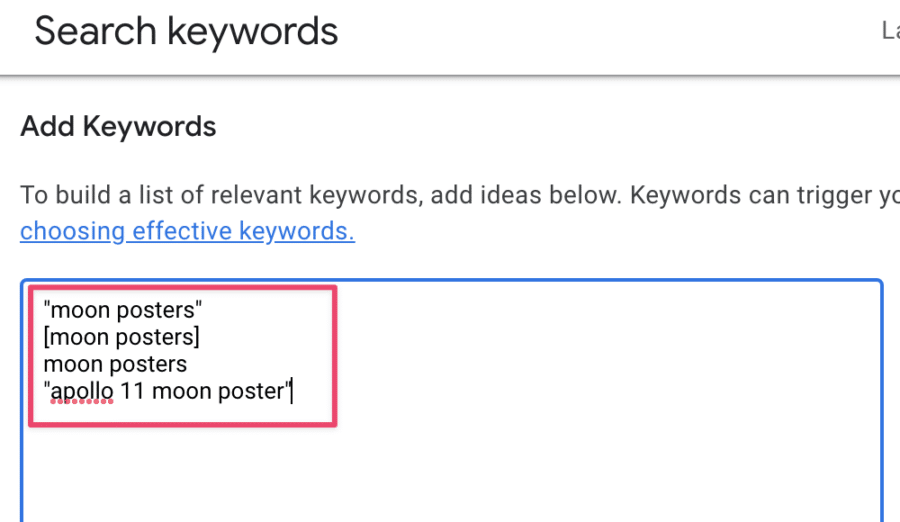
You can have different match types of the same keyword in the same ad group. They may perform differently and need different bids.
If you have a lot of keywords to add, Mergewords can help you quickly create match type variants from a seed list. For bulk changes across campaigns, the Google Ads Editor is essential.
The unresolved tension: AI vs. control
Here’s the uncomfortable truth about match types in 2026: Google is actively trying to replace keyword control with AI matching. AI Max is the latest push. It won’t be the last.
The direction is clear. Google wants you to hand over your keywords, ads, and landing pages and let their system figure out the matching. They’ve been moving this way for years: close variants expanded, phrase match got broader, broad match improved with Smart Bidding. AI Max is just the next step, removing keywords from the equation entirely with “keywordless” matching.
I think the right response is to meet Google halfway, not all the way. Broad match with Smart Bidding already gives Google room to find relevant queries beyond your exact keywords. That’s enough. You keep your keyword list as an anchor and your Search Terms Report stays readable. AI Max removes that anchor, and the reporting problems alone make it not worth it for most advertisers.
The old approach (many small ad groups with single keywords, precise phrase match behavior) doesn’t work anymore. But the fully automated approach (AI Max on everything, let Google figure it out) gives up too much control. The middle ground is broad match, Smart Bidding, intent-based ad groups, and regular Search Terms Report reviews.
Real account example: Where match types made the difference
A common situation I see: an account running single keyword ad groups (SKAGs) with hundreds of ad groups, each containing one keyword. This worked when exact match meant exact. Now it creates more problems than it solves.
The fix is always the same. Consolidate to intent-based ad groups with 5-10 related keywords per group. When we do this, three things happen: the account becomes easier to manage, ad testing actually works because each ad group has enough data, and overall clicks go up because you’re not blocking traffic with unnecessary negative keywords between ad groups.
The lesson: match types compound. Small inefficiencies across many keywords create major problems. Consolidation and clarity fix faster than adding more keywords.
Common mistakes with match types
Mistake 1: Using broad match without monitoring. Broad match is powerful but demands weekly Search Terms Report reviews. If you can’t commit to that, don’t use it.
Mistake 2: Not checking Search Terms Reports. You can’t see what searches triggered your ads unless you open this report. Check it weekly for the first month of any new campaign, then bi-weekly.
Mistake 3: Mixing all match types in one ad group without a reason. You can combine phrase and exact match in one ad group, but adding broad match just “to test” pollutes your performance data. If you want to test broad match, create a new ad group with a capped budget.
Mistake 4: Creating separate ad groups for singular/plural or reordered words. Google treats these as the same intent now. You’re wasting organization on something Google matches identically.
Mistake 5: Forgetting to check negative keyword lists. An outdated negative list blocking 20 valuable keywords is invisible in your interface. Audit them quarterly.
Mistake 6: Enabling AI Max because Google recommended it. AI Max overrides your match type settings and adds keywordless queries you can’t easily track. Google pushes it in recommendations and campaign setup. That doesn’t mean it’s right for your account. Broad match with Smart Bidding gives you the same reach without the reporting problems.
Looking forward: What’s uncertain
Google will keep pushing toward full automation. AI Max is the current version. There will be others. The pitch will always be the same: let us handle it, you’ll get more conversions.
Some of that is true. Broad match with Smart Bidding genuinely works better now than it did three years ago. But each new feature also removes a layer of control and makes your reporting less clear. At some point you have to decide where your line is.
Mine is broad match with Smart Bidding. It gives Google enough room to find relevant queries while keeping keywords as the foundation. AI Max crosses that line by adding keywordless matching and muddling attribution. Maybe it improves over time. For now, the trade-off isn’t worth it.
There’s no optimal match type configuration for 2026. What works for a $10k/month jewelry store won’t work for a $200k/month electronics retailer. Starting with broad match isn’t bad advice anymore, as long as you pair it with Smart Bidding and monitor weekly. For high-CPC accounts or tight budgets, starting with phrase match and graduating winners to exact match is still the smarter play.
Your ability to adapt as match types continue shifting matters more than picking the “right” match type today.