Performance Max is Google’s automated campaign type that runs one campaign across Search, Shopping, YouTube, Display, Discover, Gmail, and Maps. You supply the product feed, creative assets and a goal. Google’s AI decides where your ads show and what you pay.
Performance Max changed how ecommerce stores advertise on Google.
One campaign. Seven channels: Search, Shopping, YouTube, Display, Discover, Gmail, and Maps. Google’s AI decides where your ads show and what you pay per click.
That’s the pitch. After managing pMax campaigns for ecommerce stores since launch, here’s what I’ve learned.
It’s not a magic button. Performance Max amplifies whatever you feed it. Good strategy in, good results out. Bad strategy in, wasted budget out.
Most stores get mediocre results because they treat pMax as set-and-forget. They throw everything into one campaign, let Google figure it out, and wonder why ROAS keeps declining.
This guide is built specifically for ecommerce. Whether you’re spending $2K/month on your campaigns or $100K+ across multiple brands, I’ll show you what actually works in 2026.
How Performance Max Works
pMax uses Google’s machine learning to make three decisions at once: which channel to show your ad on, which user to show it to, and how much to bid.
You provide the inputs. Creative assets, audience signals, your product feed, and a conversion goal. Google’s algorithm handles the rest.
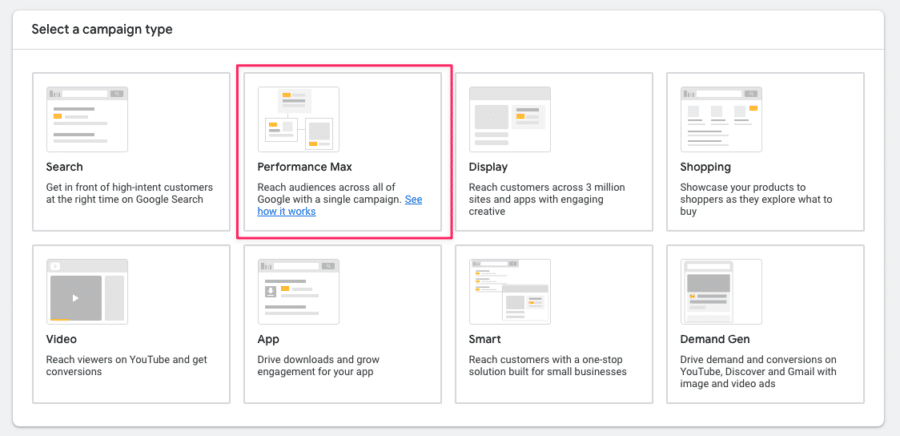
The big shift from traditional campaigns? You’re not choosing placements or setting bids anymore. You’re programming the system. Your job is to give it the right data and the right destination.
For ecommerce, the product feed is everything. It’s what determines which products show in Shopping ads, how Google matches your products to search queries, and how your ads look across channels.
Weak feed = weak Performance Max results. No amount of campaign structure fixes that.
pMax uses goal-based bidding. You set a target ROAS or target CPA, and the algorithm optimizes across all channels toward that goal.
It needs conversion data to learn. That’s why volume matters so much. I’ll explain thresholds later.
Is pMax Better Than Standard Shopping?
Honest answer: it depends.
Performance Max gives you broader reach and less manual work. Standard Shopping gives you more control over queries, bids, and product-level data.
Let’s see how they stack up:
| Performance Max | Standard Shopping | |
| Placements | Search Network, Display Network, YouTube, Gmail, Discovery & Maps | Search Network (with Search Partners) |
| Reach | Very wide | Limited |
| Bid strategy | Maximize Conversions or Maximize Conversion Value (with optional targets) | Manual CPC, Maximize Clicks or Target ROAS |
| Level of control | Low | Very high |
| Conversion volume requirements | Min 30 month | None |
| Campaign transparency | Medium | High |
| Optimization potential | Medium | Very high |
| Dynamic Remarketing included | Yes | No |
| Impact on Search Campaigns | Yes | None |
If your campaigns have 30+ conversions per month, it pays to really compare both options. But you don’t have to choose for pMax or Standard Shopping. The hybrid approach (covered later) is becoming the go-to strategy in 2026.
Where Performance Max Ads Show Up
“Where are my ads actually showing?”
I get this question all the time. Fair enough. Performance Max can spread your budget across seven Google properties, and the reporting doesn’t make it obvious.
Here’s the full breakdown:
- Google Shopping. Where most of your ecommerce budget goes. Where most conversions come from. Products show in the Shopping tab and Shopping carousels.
- Google Search. Text ads generated from your headlines and descriptions. Secondary channel for most ecommerce accounts.
- YouTube. Video and image ads. If you don’t provide video, Google auto-generates it from your images. It usually looks terrible.
- Display Network. Banner ads across partner websites. Broadest reach, lowest conversion quality.
- Discover. Ads in the Google Discover feed on mobile. Works well for visually appealing products.
- Gmail. Sponsored messages. Low volume for most stores.
- Maps. Only relevant if you have physical locations.

Check the Insights tab in Google Ads to see where your budget goes. For a healthy ecommerce pMax campaign, you want 60 to 80% of spend on Shopping.
If Display or YouTube is eating too much budget, your Shopping feed probably needs work. The algorithm is finding it easier to spend on awareness channels than on high-intent Shopping placements.
What Changed in 2026
Performance Max keeps evolving. Here are the updates that actually matter for ecommerce. Not every minor tweak. Just the ones that should change how you run campaigns.
The Power Pack
Google introduced the “Power Pack” at Google Marketing Live in 2025. It replaces the old “Power Pair” (pMax + Search).
The new recommendation: three campaign types working together. Performance Max for full-funnel performance. Demand Gen for mid-funnel awareness. AI Max for enhanced Search.
My take? For most ecommerce stores, The Power Pack is synonymous with Google trying to get you to spend more. Demand Gen can be interesting if you have the creative and budget to invest in top of the funnel. AI Max currently is a hot pile of garbage.
Asset Studio and AI Creative
Google’s Asset Studio now generates images and videos inside Google Ads using Imagen 4, Veo and Nano Banana Pro. AI image generation has been pretty poor, but with Nano Banana Pro, Google’s Gemini model has really stepped up.
For stores running pMax with only product images and no video, this matters. Google’s algorithm favors campaigns with video. Stores that added video are seeing 25 to 40% better performance.
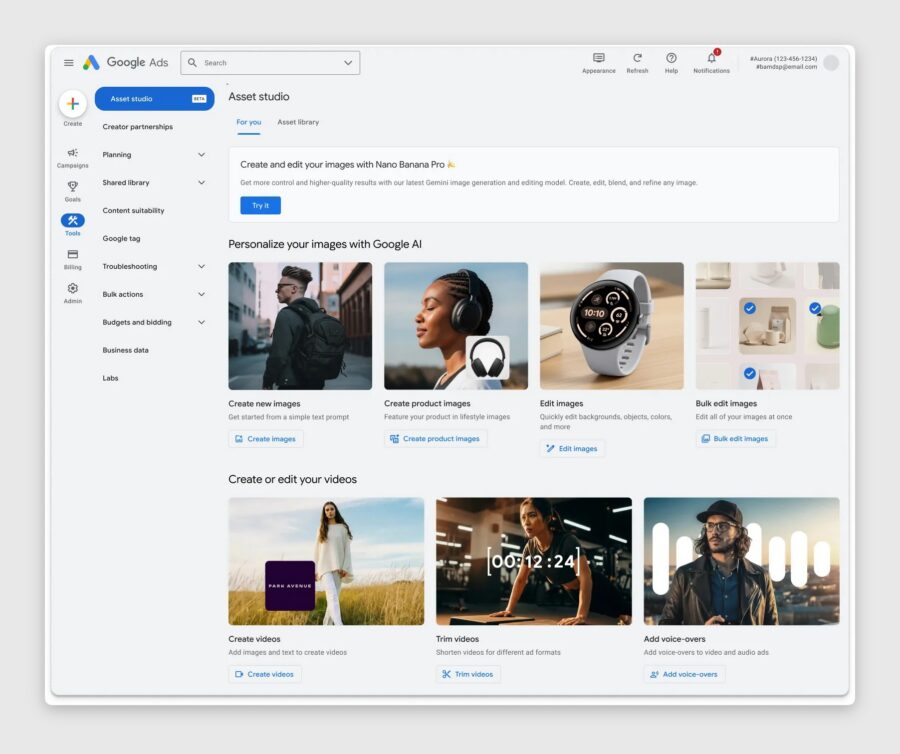
Asset Studio lowers the bar for getting video into your campaigns. But the quality is inconsistent. Fine for generic lifestyle imagery. Not great if your brand has a specific look.
Review what it produces. Don’t let it run unchecked.
Audience Exclusions
This one’s big.
For years, you could exclude keywords and placements from Performance Max. But not customer lists. Now you can exclude customer match and remarketing lists.
Why does this matter? It lets you separate acquisition from retention. Run one pMax campaign for new customers only by excluding your existing buyer list. Handle remarketing separately.
If you sell subscriptions or have strong repeat-purchase behavior, this feature alone justifies restructuring your campaigns.
pMax Experiments
There are now three experiment types that involve Performance Max: pMax vs Standard Shopping, pMax vs Search, and testing the uplift of adding pMax alongside existing campaigns.
But these are still lacking, the very nature of pMax makes it very hard to run clean experiments. The preset ones above will produce a skewed result.
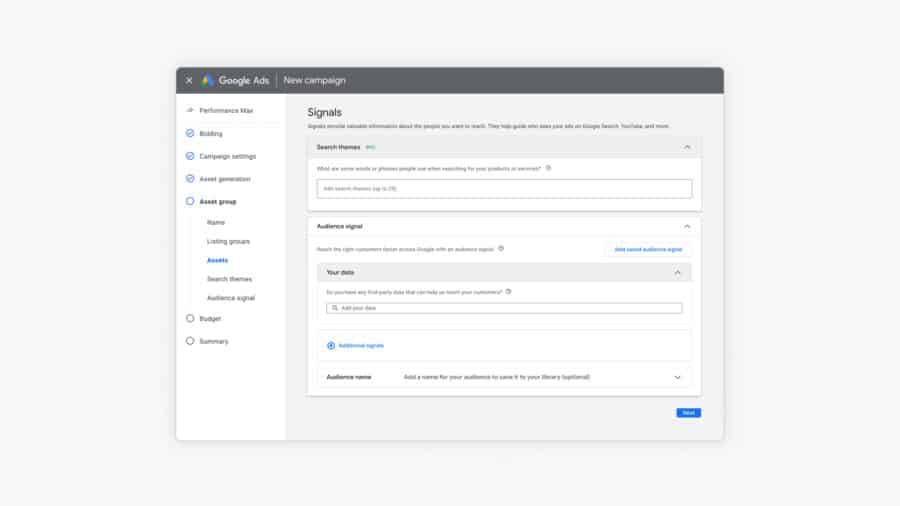
Search Themes Expanded to 50
pMax search themes doubled from 25 to 50 per asset group.
Search themes tell Google which queries your campaign should target. More slots means more room to guide the algorithm, especially for niche products or long-tail searches your feed might not cover.
Impact of pMax on Other Campaigns
One of the most important things to discuss when it comes to pMax is the impact it will have on other Google Ads campaigns in your account.
To do that, let’s look at the chart below.
It shows the impact of Performance Max on the campaigns in the first column, and which campaign will enter the auction.
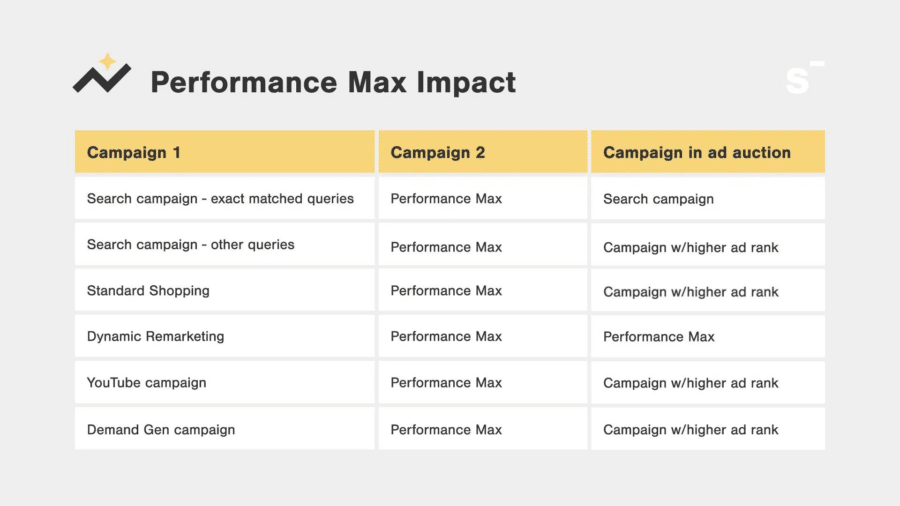
To me, the most important part of that chart is the impact on branded search campaigns.
If you have both a keyword-based search campaign that uses phrase or broad match keywords, and a Performance Max campaign, the latter will probably show.
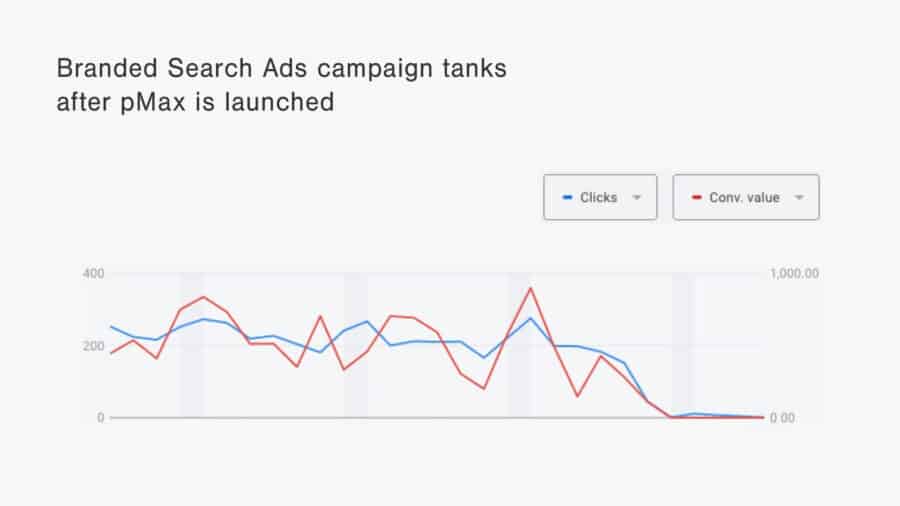
That means that if you have Search campaigns that target your branded keywords, depending on how the keywords are matched, Performance Max will take credit for those conversions.
Since branded searches usually are the most profitable campaign that you can run in Google Ads, your pMax campaign will look very good, without adding incremental revenue.
So you want to be aware that this can happen.
If you want to, you can make sure that your branded search campaigns are set up in such a way that this isn’t possible. You can either have the exact keyword in your Google Ads campaign or have a higher ad rank. Or you can exclude your brand from pMax using the brand exclusions feature.
Since we can’t see keywords or quality scores for pMax campaigns, you’ll be guessing if your campaign is showing up or not.
Performance Max Campaign Structure for Ecommerce
This is where most ecommerce advertisers go wrong.
And it’s where the gap between mediocre and great results usually lives.
The core tension: Google’s algorithm needs conversion data to learn. Each pMax campaign needs roughly 20 to 30 conversions per month to exit the learning phase. Split your budget across too many campaigns and each one starves.
The Over-Segmentation Trap
I see this all the time.
A store gets 50 conversions per month. They create five Performance Max campaigns, one per product category. Each campaign gets 10 conversions. Not enough for the algorithm to learn.
Performance is mediocre everywhere. The store owner blames pMax.
pMax isn’t the problem. The structure is.
Rule of thumb: don’t create more campaigns than your conversion volume can support. 30 to 50 conversions per month? One or two campaigns. Over 100? Start segmenting.
How to Segment (When You Have the Volume)
When you can support multiple campaigns, segment by business objective. Not product category.
- High-margin hero products get their own campaign with a specific ROAS target.
- Standard catalog goes in one workhorse campaign with a moderate ROAS target.
- Clearance or low-margin products get a separate campaign with different economics.
Why this matters: a product with 60% margins and a product at 10% margins need different ROAS targets. Put them in the same campaign and the algorithm defaults to whatever converts easiest. That’s usually your best sellers. Everything else gets starved.
Recommended Structures by Spend Level
| Monthly Spend | Campaigns | Structure |
| Under $3K | 1 | Single pMax campaign. All products. Focus on feed quality. Don’t split yet. |
| $3K to $10K | 1 to 2 | One main pMax. Optionally split hero products if you have 30+ conversions/month per campaign. |
| $10K to $50K | 2 to 3 | Segment by margin tier. Start testing Performance Max vs Shopping experiments. |
| $50K+ | 3 to 5 | Full segmentation. Hybrid pMax + Standard Shopping. Possible separate acquisition and retention. |
Asset Group Strategy
Asset groups are the building blocks inside a pMax campaign. Each one holds creative assets, audience signals, and a product feed segment.
Think of them as ad groups for Performance Max.
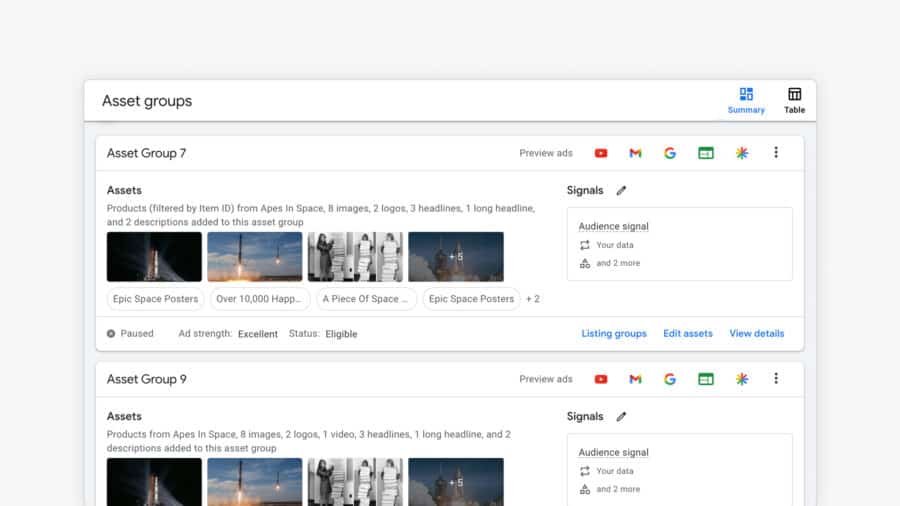
Full Asset Groups vs Feed-Only
This decision matters more than most people realize.
Full asset groups include headlines, descriptions, images, and videos. Google uses everything to build ads across all channels. More creative = more places the algorithm can spend.
Feed-only asset groups strip out all creative. Just the product feed. This limits your ads to Shopping and Dynamic Remarketing.
Sounds restrictive? For ecommerce, that’s a feature.
I recommend most stores start with feed-only. It forces your budget into Shopping, which is almost always your highest-converting channel.
Adding full creative from day one often means Google spends a chunk of your budget testing Display and YouTube placements that don’t convert. Better to nail Shopping first, then expand.
Plus, new advertisers tend to waste a lot of time on headlines, images or videos that never get shown!
How to Organize Asset Groups
- Group by product category or theme. Selling apparel? Separate asset groups for tops, bottoms, accessories. Each gets tailored creative.
- Match audience signals to each group. A running shoes group should have in-market audiences for athletic footwear and custom segments from running searches.
- Keep creative specific. Don’t reuse the same generic imagery across every group.
- 3 to 7 asset groups per campaign. Enough to segment. Few enough that each group gets meaningful data.
Avoid product overlap or duplicating asset groups based on audience signals. This is a strategy that no longer works in 2026. Performance of these duplicate asset groups tends to converge to the same average after some time.
Audience Signals
Audience signals are suggestions, not hard targeting. You’re telling Google “people like this tend to buy.” The algorithm starts there and expands.
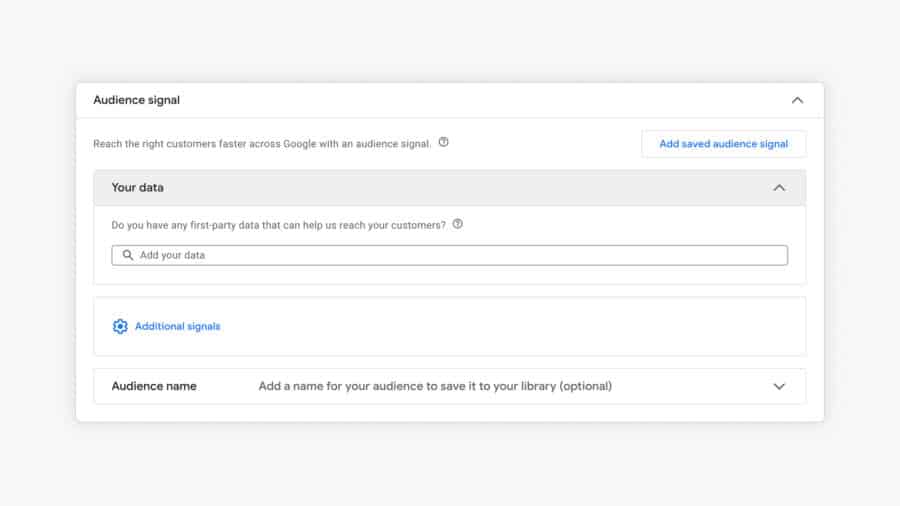
The most valuable signals for ecommerce pMax:
- Customer match lists. Upload your buyer emails. Google finds similar users. This is your strongest signal.
- Website visitors. Remarketing audiences. Product page viewers, cart abandoners, past purchasers.
- In-market audiences. Google’s pre-built audiences of people actively shopping in your category.
- Custom segments. Build audiences from search terms or competitor websites. Powerful but takes testing.
Quality over quantity. One customer match list from real buyers beats a dozen broad in-market audiences.
Conversion Volume Thresholds
The most important constraint in Performance Max. And the most underrated.
Each campaign needs 20 to 30 conversions per month to optimize properly. Below that, the algorithm is guessing.
Under 30 conversions total? One campaign. Don’t split. Data density beats perfect segmentation.
30 to 60? You can support two campaigns. Be strategic about the split.
100+? Now you have room for real segmentation.
Headlines, Descriptions & Creative Assets
pMax lets you provide up to 15 headlines, 5 long headlines, and 5 descriptions per asset group. Google mixes and matches them dynamically.
Writing Good Headlines
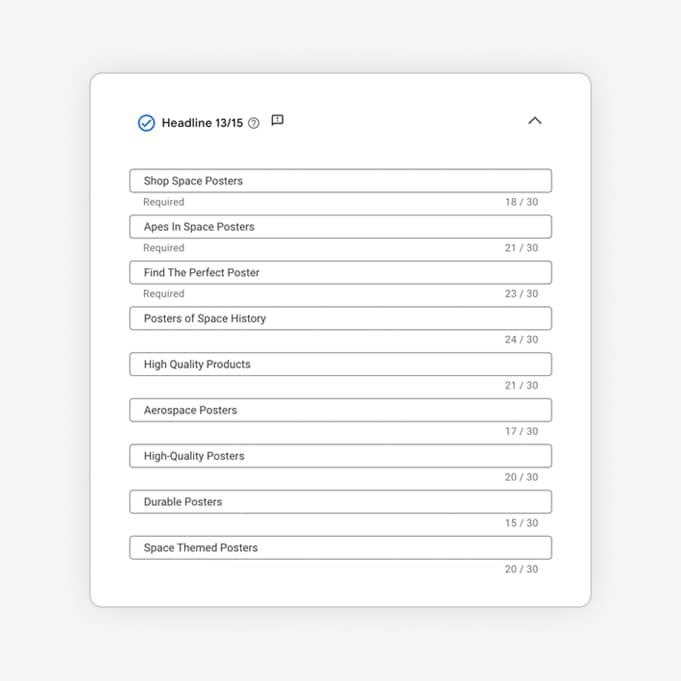
You get 30 characters for regular headlines, 90 for long headlines.
- Lead with your main keyword: use the actual search terms that your customers are using
- Don’t forget your USPs. “Free Shipping Over $50.” “4.8 Star Rated.” “Handmade in Italy.” Don’t waste a headline on just your brand name.
- Use specific numbers. “30% Off First Order” beats “Great Deals Available.”
- Mix your angles. Value props, social proof, urgency, product features. Give the algorithm variety.
Use a good mix of headlines, but don’t stress if you don’t have all 15 slots.
Images

pMax requires at least one landscape (1.91:1), one square (1:1), and one portrait (4:5). But minimum isn’t optimal.
Aim for 5 to 10 images per asset group. Mix product shots and lifestyle. Use high-quality, well-lit photography. This directly impacts your Shopping CTR.
Video
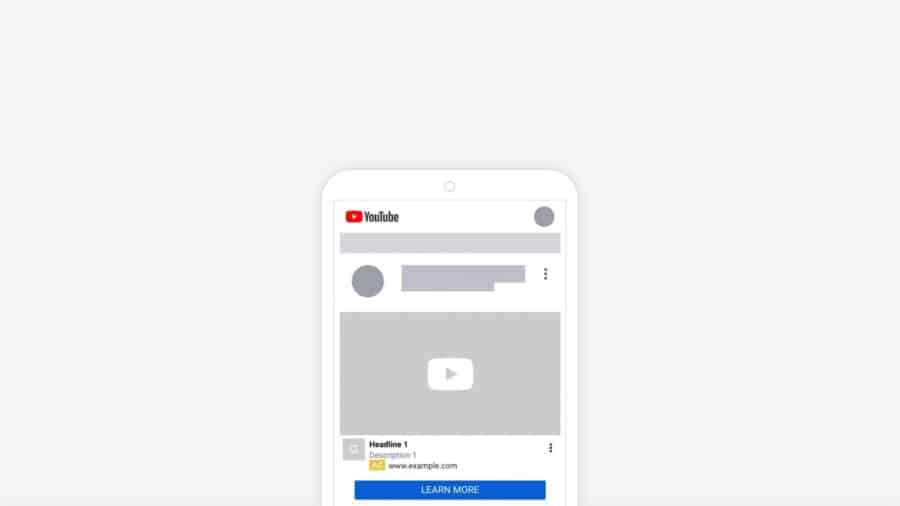
Video matters more than ever in pMax. Google’s testing shows 25 to 40% better performance for campaigns with video vs image-only.
If you don’t provide video, Google will auto-generate it. The result is a sad slideshow. It hurts more than it helps.
Even a simple 15 to 30 second product video is better than nothing. Show the product in use. Highlight the key benefit. Done.
Feed Optimization for pMax
Your product feed is the single most important input to a Performance Max campaign.
The algorithm uses it to match products to queries, build Shopping ads, and inform dynamic creative. Thin feed = thin results.
Highest-impact optimizations:
- Product titles. Front-load searchable attributes. Pattern: [Brand] + [Product Type] + [Key Attribute] + [Size/Color]. This is your biggest lever for Shopping visibility.
- Custom labels. Segment products by margin, best-seller status, seasonality, or price tier. This is how you control which products go into which campaigns.
- Descriptions. Include relevant search terms naturally. Google uses these for broader query matching.
- Images. White background for Shopping. Lifestyle shots as additional images for Display and Discover.
Supplemental feeds. Enrich your main feed without touching your platform’s native export. Great for custom labels and title overrides.
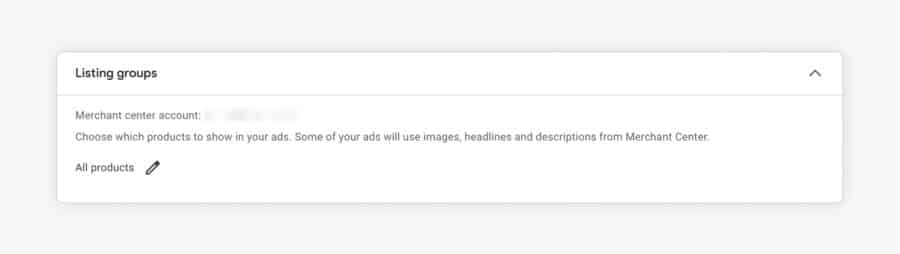
I go deep on feed optimization in dedicated guides. If your pMax performance is underwhelming, start here.
pMax vs Standard Shopping: The Hybrid Approach
Here’s a trend worth paying attention to.
Smart ecommerce advertisers stopped running Performance Max alone in 2026. They’re pairing it with Standard Shopping.
Why? Because pMax has blind spots.
- You can’t see which search queries trigger your Shopping ads. Not with any real precision.
- New products struggle to get impressions. The algorithm has no historical data to work with.
- Best sellers hog the budget. Long-tail products starve.
Standard Shopping fixes each of these. The hybrid play isn’t about replacing pMax. It’s about filling gaps.
How it works:
- pMax handles the core catalog. Products with proven performance. Let the algorithm optimize across channels.
- Standard Shopping handles specific needs. New launches, high-value queries where you want granular control, product categories where you need search term data.
- Priority settings prevent overlap. pMax generally takes priority in the auction. Structure Standard Shopping to catch what Performance Max misses.
Not everyone needs the hybrid setup. Under $5K/month with a small catalog? pMax alone is fine.
Large catalog, frequent new arrivals, or need for granular control? Hybrid gives you the best of both.
pMax Strategy by Budget Level
What works at $100K/month doesn’t work at $1K/month.
Under $1K/month
If you’re just starting, or you’re spending less than $1k/mo, stay away from Performance Max campaigns. Because of your limited budget, you need to take more control over where your ads appear. And that means avoiding things like Display campaigns or YouTube Ads.
Stick to Standard Shopping and Search campaigns.
$1K to $3K/month
Keep it simple. One pMax campaign. All products.
Put your energy into feed quality: titles, images, descriptions. Don’t try to segment yet. Give the algorithm every conversion you can.
Consider starting feed-only to keep budget focused on Shopping.
$3K to $10K/month
Enough data for real optimization. If you’re hitting 30+ conversions per month, consider splitting hero products into their own campaign.
Start testing audience signals. Start adding more assets. Treat your product feed well.
$10K-$50K/month
More volume means more possible campaigns to account for business needs or product requirements.
Can consider splitting acquisition from retention and doing more with video.
At this level, feed optimization should be ongoing, not a one-time setup. At this spend, many stores bring in outside help. If you’re weighing a Google Ads freelancer or agency, here’s how to choose.
$50K+/month
Again more volume gives you more options. At this stage, hybrid pMax + Standard Shopping can really help push certain products.
Here is an example from medical apparel brand FIGS, which spends millions a month on Google Ads. They’ve set up several Performance Max campaigns, each focusing on a particular product or category, allowing the company to concentrate its budget on specific areas:
- Best Sellers: all of their best-selling products
- Women – Scrubs: all scrubs for women
- Men – Scrubs: all scrubs for men
- The Set: The bundle is very important for them. They got 2 variations, men’s and women’s and they’re pushing them hard
- Unisex – Non-Scrubs: all of their non scrubs products. It’s important but probably not as an acquisition channel.
- Color Launch: it’s interesting that they’re pushing specific (new) products
7 Common pMax Mistakes
In our audit of 122 ecommerce accounts, 64 of the 84 accounts running Performance Max had at least one Performance Max problem.
here are the most common ones:
1. Too Many Campaigns, Not Enough Data
Five campaigns with 10 conversions each will always lose to one campaign with 50. Consolidate until your volume supports splitting.
2. Ignoring the Feed
Advertisers obsess over campaign settings and ignore the feed. Thin titles, missing attributes, and bad images kill Shopping performance.
3. Not knowing which assets are important
Look at your Channel Performance report in Performance Max to see where your campaigns is spending. Focus your efforts on improving those assets.
4. Mixing Margins in One Campaign
A single ROAS target can’t serve 60% margin products and 10% margin products at the same time. The algorithm defaults to your best sellers. Everything else starves.
5. Set and Forget
pMax still needs regular check-ins. Placement distribution, search terms, creative refresh, audience signal updates. Monthly reviews at minimum.
6. Skipping Search Themes
Search themes are optional. Many advertisers skip them. Mistake. For niche products, search themes help the algorithm find the right queries faster. Use all 50 slots.
7. Consider alternatives
The best results come from not blindly following a script for too long. Don’t be afraid to regularly experiment to see how Standard Shopping compares, how a fully-built asset group performs, how video can change your campaign, etc.
Getting Started with Performance Max
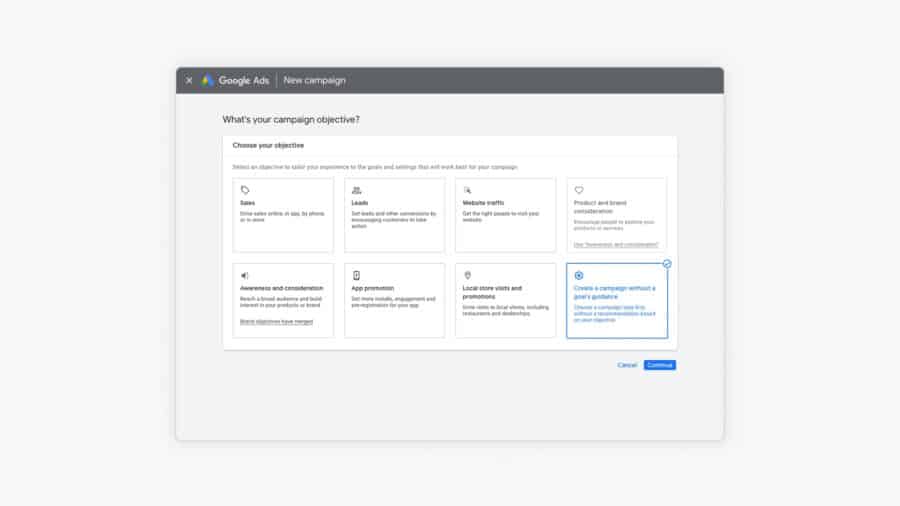
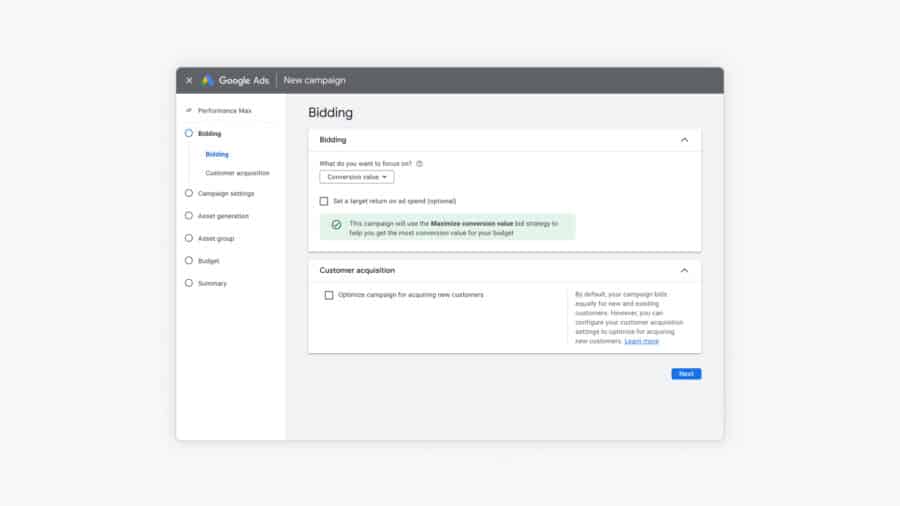
Setting up pMax for the first time? Here’s the sequence I recommend.
- Consider the hybrid approach once you’re comfortable with pMax performance.
- Get your product feed in order first. Titles, descriptions, images. Before you touch campaign setup.
- Start with one pMax campaign covering your full catalog.
- Run feed-only for the first 2 to 4 weeks. Establish a Shopping baseline.
- Add creative assets once Shopping performance is stable. Images first, then video.
- Layer in audience signals. Customer match and website visitors first.
- After 30+ conversions per month, evaluate whether segmentation makes sense.
Frequently Asked Questions About Performance Max
Why is my Performance Max campaign not spending?
The most common causes: your budget is too low relative to your tCPA/tROAS target, your feed has disapprovals limiting Shopping inventory, or the campaign is still in learning. Loosen the target 20-30% before touching anything else.
Where do Performance Max ads actually show?
Across seven surfaces: Search, Shopping, YouTube, Display, Discover, Gmail, and Maps. For feed-based retail accounts, expect 60-80% of spend to flow to Shopping placements. You can check the split with the channel reporting Google rolled out in 2025.
How long should I wait before judging a Performance Max campaign?
Give it 4-6 weeks and at least 30-50 conversions before drawing conclusions. Judging pMax on week one is the most common mistake I see in audits.
Is Performance Max better than Standard Shopping?
For most stores, pMax wins on volume and Standard Shopping wins on control. Check where pMax conversions come from before declaring victory: brand cannibalization flatters pMax numbers.
Want someone to run this for you? Start with a free account review, and we’ll show you where your Performance Max campaigns lose money.
For ongoing optimization once your campaigns are running, check out my pMax optimization guide.